


7 critical mistakes when ordering a mobile app — how not to waste your budget
Critical Mobile App Development Mistakes That Cost Time, Money, and Reputation
Hiring the wrong developer or misunderstanding the app development process can lead to serious setbacks — wasted budgets, missed deadlines, and apps that never make it to market.
While millions of apps are available in the App Store and Google Play, only a small percentage generate real revenue. The problem isn’t always bad design or buggy code — many failures begin before a single line is written.
After analyzing hundreds of projects, we’ve identified 7 common mistakes businesses make when ordering mobile apps. The good news? If you know what to avoid early on, your chances of success grow dramatically.
Why Most Mobile Apps Fail to Achieve Their Goals
There are millions of apps on the App Store and Google Play — but only a small fraction succeed. Many get downloaded just a handful of times, receive poor reviews, or never make it past app store moderation.
In most cases, the biggest mistakes happen during the planning phase. A weak strategy, unclear goals, or skipping user research often doom the project long before development starts.
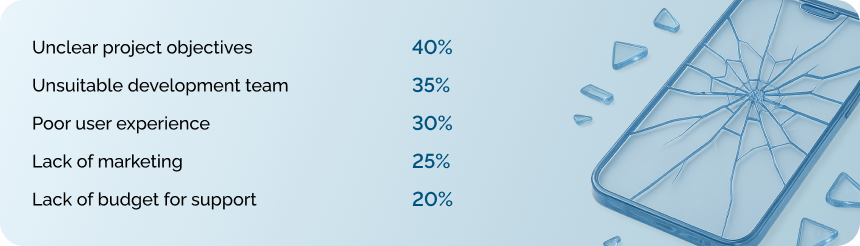
Most critical mistakes happen during the planning stage.
What happens when there’s no spec?
Many clients think saying “I want an app like Uber but for flower delivery” is enough. It’s not. That kind of vague description gives developers zero clarity on what needs to be built.
Real case: A restaurant chain owner requested a food delivery app. His brief: “Just like any other app — pick a dish, pay, get the order.”
But once we dug into the details, it turned out a “simple” food delivery app involves over 40 core features — user registration, menu catalog, cart, multiple payment methods, order tracking, reviews, loyalty programs, push notifications…
The result? Half of the needed functionality hadn’t even crossed the client’s mind. The scope had to be completely revised mid‑way.
How to write a solid requirements document
A strong mobile app spec should include:
✅ Project Overview
-
What problem does the app solve?
-
Who is the target user?
-
How does it support the business?
✅ Features & Functionality
-
What can users do in the app?
-
How does each feature work?
-
What data needs to be stored?
✅ Technical Requirements
-
What platforms and devices should it support?
-
What systems does it integrate with (website, CRM)?
-
What third‑party services are needed (payments, maps, analytics)?
✅ Design
-
Brand identity guidelines
-
Examples of apps with the preferred look & feel
-
Any accessibility or UI preferences
At Nomium, we’ve created a detailed mobile app spec template to help clients structure their requirements from day one.
👉 [Download the spec template]⏱ Estimated time to prepare: 2–3 weeks
Mistake #2: Choosing developers based solely on price
Why cheap development costs more
“I found a team that does it three times cheaper than the rest” — such customers often come back six months later with a request to redo the project.
What’s behind the low price:
- Inexperienced developers learn on your project
- Poor planning — they give an underestimated quote to get the order
- Communication problems when working with teams from other countries
- Lack of support — after the project is delivered, the team disappears
A classic example: a startup ordered the development of a mobile application from freelancers at the lowest price. A few months later, they received a product with critical errors and unstable performance. They had to hire a new team and essentially create the application from scratch.
How to choose a team of developers
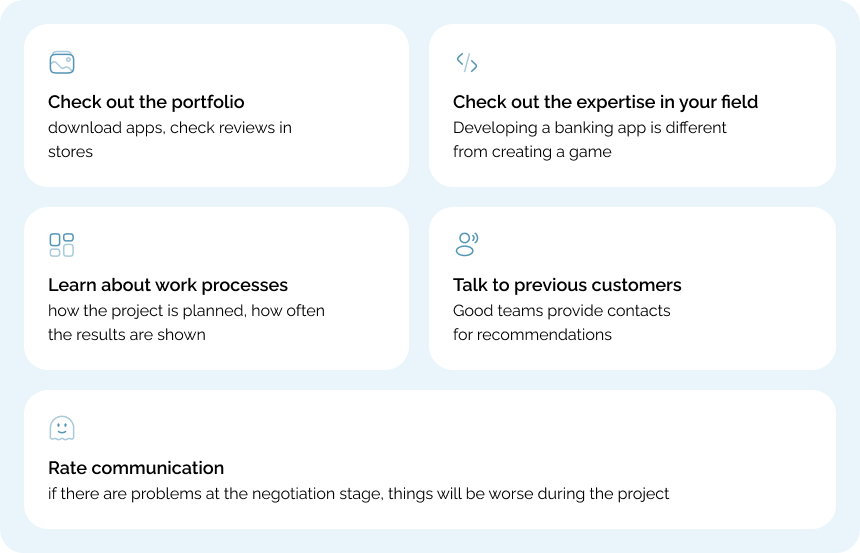
Key criteria for selecting a team
Mistake #3: Not studying users
Why research is necessary
“We know our customers” is a dangerous assumption. People’s behavior in mobile applications differs from their habits on websites or offline.
Features of mobile use:
- Used in different situations: at home, on public transport, at work.
- Often distracted by calls and notifications.
- Expect fast app performance.
- Easily delete inconvenient apps.
A telling example: the team was developing an app for booking doctor’s appointments. The client believed that the main users would be young mothers. Research showed that the majority were people over 45 who were booking appointments not only for themselves but also for their parents.
The approach had to be changed: fonts were enlarged, the menu was simplified, and the ability to manage multiple profiles was added.
How to study your audience
- Conduct interviews with 10–15 potential users
- Study competitors and reviews in the App Store and Google Play
- Analyze behavior on the website — how mobile users act
- Create a prototype and test layouts of the main screens
⏰ Time for research: 1–2 weeks
Mistake #4: Saving on design
The impact of design on app success
Design determines whether users will return to the app. First impressions are formed in a matter of seconds.
Statistics:
- 88% of users do not return after a bad first experience
- Good design increases conversion by 2–3 times
- High-quality design improves ratings in the App Store and Google Play
Example: a taxi app had low conversion rates. The main problems were a gray order button, complicated address entry, and a lack of information about waiting times. After the redesign, the functionality remained the same, but the metrics improved significantly.
Cost of design corrections
Correcting the design after launch is significantly more expensive:
- The interface code is rewritten.
Mistake #5: Skipping the testing stage
What to test
“Why waste time testing? Users will find the bugs themselves” is dangerous logic. In practice, users don’t look for bugs; they just delete the app.
Mobile apps require thorough testing:
- Different devices — behavior on iPhone 8 and iPhone 16 Pro Max may differ.
- Different scenarios — poor internet connection, incoming calls.
- Performance — download speed, battery consumption.
- Security — personal data protection.
⏰ Testing time: 1–3 weeks.
Mistake #6: Forgetting about marketing
ASO and promotion
App Store Optimization makes your app visible in mobile store searches. It is important to consider many ASO factors during the development stage.
Key elements:
- App name — the most important factor. It should contain keywords for search.
- Icon and screenshots — the first thing users see. They determine whether users will download the app or pass it by.
- Analytics — without it, it is impossible to understand how users interact with the app.
⏰ Time to set up marketing: 1–2 weeks
Mistake #7: Not planning for support
How much does support cost?
The release of an app is not the end of the project, but rather its beginning. Any app requires regular support and development.
Main expenses:
- Bug fixes — even tested apps can contain bugs.
- OS updates — adaptation to new versions of iOS and Android.
- Servers — hosting, scaling, backups.
- User support — answering questions and working with reviews.
Support requires ongoing investment and usually accounts for a significant portion of the initial development cost each year.
After release, it is necessary to monitor the application’s performance, release updates, analyze data, and engage in promotion.
⏰ Support: a continuous process
How to avoid mistakes: a step-by-step plan
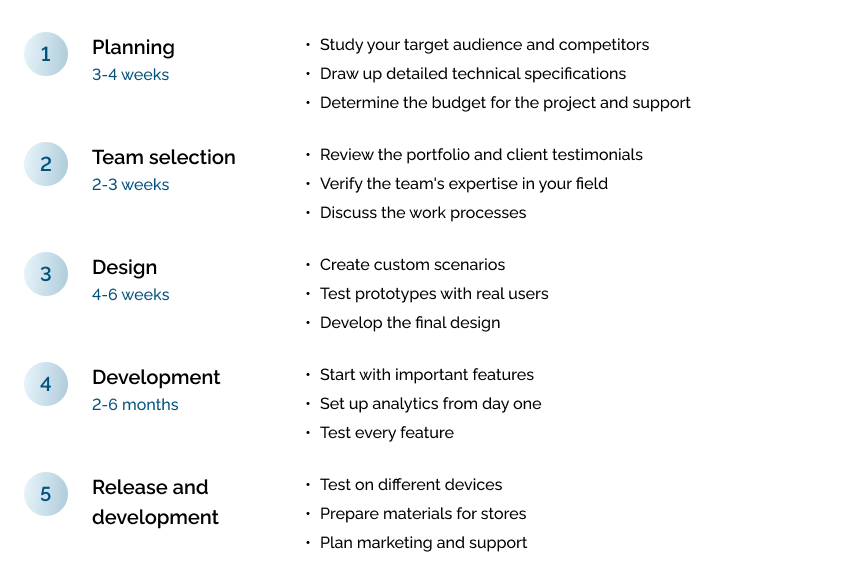
Steps for preparation and launch without critical errors
- Goals and KPIs: formulate business goals, success metrics, limitations, and risks.
- Brief and technical specifications: define functionality, user roles, integrations, and non-functional requirements.
- Research and prototype: interview 10–15 users, analyze competitors, create a clickable prototype of key scenarios.
- Design system: UI kit, typography and color guide, accessibility, layouts of main screens.
- Architecture and stack: module diagram, API contracts, data model, DevOps plan (CI/CD, environments).
- Release plan and budget: sprint roadmap, MVP prioritization, risk and support reserve.
- MVP development: short iterations, code reviews, automated tests, performance monitoring.
- Testing: devices and OS, offline/poor connection, security, load, and power consumption.
- ASO and launch: name, icon, screenshots, side texts, analytics, publication checklist.
- Support and growth: update cycle, working with reviews, A/B experiments, data-driven development.
Conclusion: 6 rules for successful development
Creating a mobile app requires attention to detail at every stage. Most failures are due to mistakes in planning.
Key principles for success:
- Plan ahead—it’s better to spend a month planning than six months fixing mistakes.
- Choose a team based on expertise, not price—it’s cheaper to pay professionals up front.
- Invest in high-quality design — it’s the foundation of an app’s success.
- Be sure to test the app — users don’t forgive bugs.
- Plan your marketing in advance — a great app can go unnoticed.
- Be prepared to provide support — without it, the product won’t evolve.
It’s better to spend more time preparing than to fix mistakes at great expense.
Rate this article!





Leave your comment